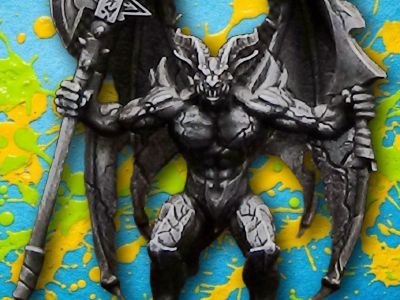
Painting HeroQuest: Episode 12 - The Gargoyle
In this video I show you step-by-step how to paint the Gargoyles from the Mythic Tier of the 2021 version of HeroQuest by Avalon Hill.
Steps
- 1 Base-coat the base-set (grey) gargoyle with Gravelord Grey over the entire model.
- 2 Base-coat the Mythic-tier gargoyle with Brownish Decay for a warmer stone, closer to the Kellar's Keep cover art.
- 3 Dry-brush the grey gargoyle with Pale Grey Blue to bring out the raised edges.
- 4 Dry-brush the brown gargoyle with Screaming Skull the same way.
- 5 Fill in the eye sockets with Purity White on both miniatures as a base for a glow effect.
- 6 Paint both bases with Mechanicus Standard Grey.
- 7 Paint over the eyes with Blue Fluorescent on the brown gargoyle, contrasting with its warm stone.
- 8 Paint over the eyes with Orange Fluorescent on the grey gargoyle, contrasting with its cooler stone.
Paints used
Gravelord Grey (Army Painter)
Base coat for the base-set gargoyle's stone body
Brownish Decay (Army Painter)
Base coat for the Mythic-tier gargoyle's stone body
Pale Grey Blue (Vallejo)
Dry-brushed over the raised surfaces of the grey gargoyle
Screaming Skull (Citadel)
Dry-brushed over the raised surfaces of the brown gargoyle
Purity White (Scale75 Scalecolor)
Base fill for the eye sockets on both gargoyles, before the glowing fluorescent color
Mechanicus Standard Grey (Citadel)
Base coat for both gargoyles' bases
Blue Fluorescent (Vallejo)
Glowing eyes on the brown gargoyle, for contrast with its warm stone
Orange Fluorescent (Vallejo)
Glowing eyes on the grey gargoyle, for contrast with its cooler stone